Category: Engineering

  • PCB Drone Motor – 03

    PCB Drone Motor – 03

    Computational Estimation of Magnetic Flux Density for Layered Annular Sector Coils

    Building on my first attempt using circular loops, this post details a more refined Python analysis of airgap flux density. This version increases realism by modeling windings as multi-layer annular sectors – a shape better reflecting my design – calculated using the Biot-Savart law. For windings supported by materials like FR4 PCB (µᵣ ≈ 1, similar to air), the Biot-Savart ‘air’ calculation holds well. Consequently, these results should be reasonably close to FEA simulations configured to neglect secondary effects. Finite Element Analysis (FEA) is still the logical progression and my planned next step in evaluating this design.
    (The Python notebook can be downloaded at the bottom of the page)
    Motivation: Towards Realistic Coil Geometry

    A real motor winding isn’t just a single loop. It consists of multiple turns wound layer upon layer. To capture this more accurately, this simulation models each layer as a series of contracting annular sectors. Imagine starting with the outermost boundary of the coil cross-section and then winding inwards, turn by turn, with a defined spacing. Furthermore, multiple such layers are stacked axially, offset slightly from each other. This approach provides a much better geometric approximation of the actual current distribution compared to a single, simple loop.

    The Approach: Iterative Geometry and Grid-Based Biot-Savart

    1. Generating the Winding Paths:

      • The core shape is an annular sector (a slice of a doughnut).

      • The create_single_sector_perimeter_angled_closed function generates the points defining the perimeter of one such sector.

      • The key generate_disconnected_loops function takes the initial outer/inner radii and angle and iteratively calculates the geometry for subsequent turns within a layer. It reduces the outer radius and increases the inner radius by the SPIRAL_SPACING for each “turn,” also adjusting the angular width slightly to approximate constant wire width. This continues until the inner and outer radii meet or a maximum loop count (MAX_LOOPS_PER_LAYER) is reached.

      • This process creates a list of 2D loop paths representing the turns within a single layer.

      • Multiple layers are then created by copying this 2D loop list and assigning different Z-coordinates based on NUM_LAYERS and LAYER_OFFSET.

    2. Defining the Calculation Space:

      • Instead of calculating the field everywhere (computationally expensive), we define a specific region of interest: the airgap.

      • The annulus_grid_points_xyz_angle function generates a grid of points within an annular sector located at the specified AIRGAP_DISTANCE from the first layer. The density of this grid is controlled by NUM_RADIAL_GRID and NUM_ANGULAR_GRID.

    3. Applying Biot-Savart:

      • The standard biot_savart_segment_at_point function remains the workhorse. It calculates the infinitesimal magnetic field vector (dB) produced by a short, straight segment of current-carrying wire (dl_vec) at a specific point in space (point).

      • The main calculation loop iterates through every point in the airgap grid.

      • For each airgap point, it then iterates through every segment of every loop in every layer.

      • It calls biot_savart_segment_at_point for each segment and sums up all the resulting dB vectors to get the total magnetic field vector B = (Bx, By, Bz) at that specific airgap grid point.

    Visualization and Results:

    The script generates three key visualizations:

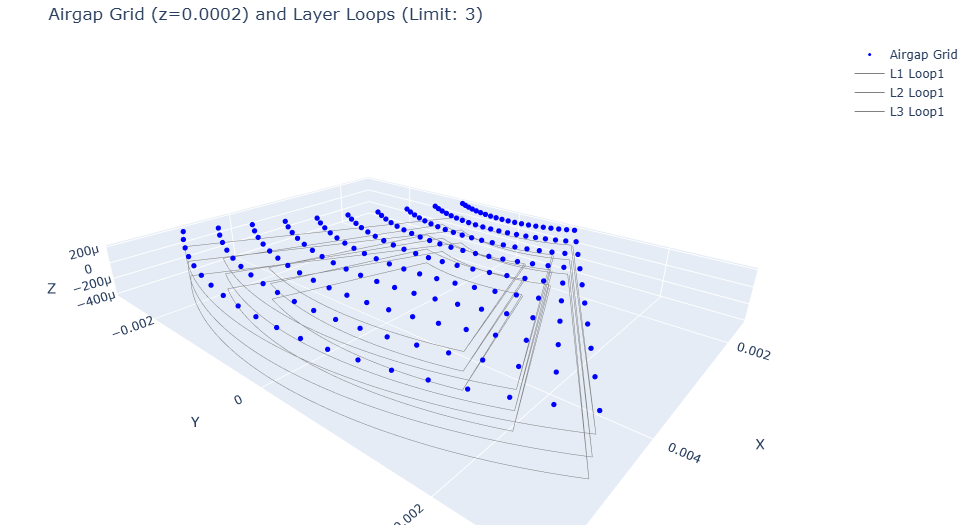
    1. 3D Grid & Paths: Shows the physical layout of the multi-layer coil loops (grey lines) and the grid points in the airgap (blue dots) where the field is calculated. This helps verify the geometry setup.

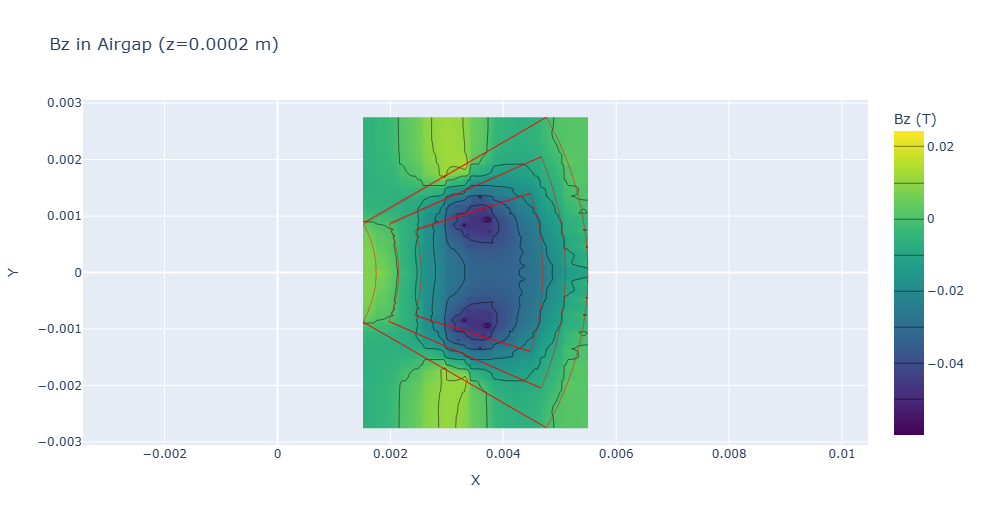
    2. Bz Heatmap: Displays the calculated Z-component of the magnetic field (Bz) as a 2D heatmap on the airgap plane. The outlines of the 2D loops are overlaid in red for context. This is often the most critical component for axial flux machine performance.

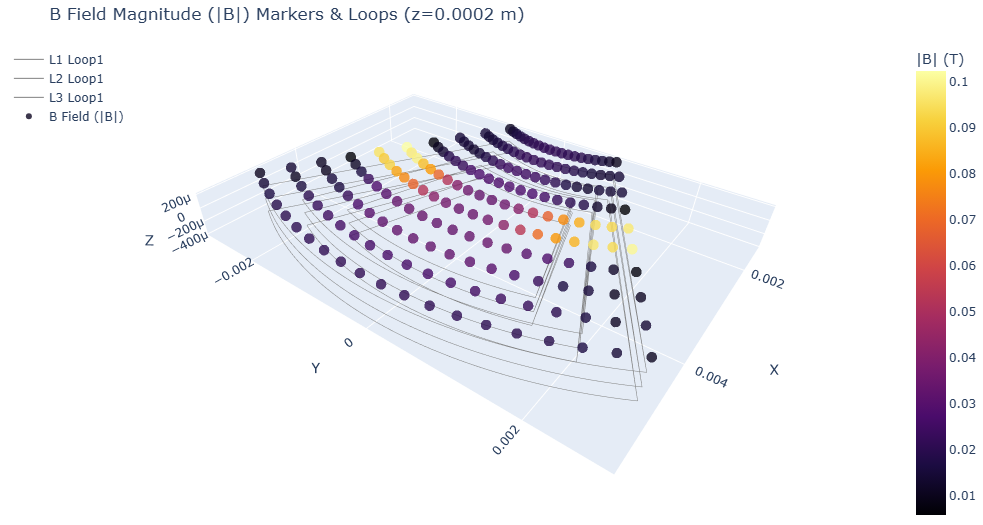
    3. B-Field Magnitude Markers: A 3D plot showing the coil loops again, but this time with markers at the airgap grid points. The color of each marker represents the magnitude (|B|) of the magnetic field at that point. (Initially, go.Cone glyphs were used to show direction, but rendering issues with Plotly v6.0.1 when combining many cones and lines necessitated this switch to markers for reliability).

    Limitations of the Analytical Approach

    While more refined, this model still relies on assumptions and has limitations:

    • Idealized Geometry: Assumes perfect annular sectors and uniform current density within wires.

    • No Eddy Currents: Doesn’t account for induced currents in conductive materials.

    • Computational Cost: Calculating the field from every segment for every grid point can become slow, especially with high point densities or many layers/turns.

    Next Steps: Embracing FEA

    These limitations highlight why Finite Element Analysis (FEA) is the standard tool for detailed motor design. FEA can:

    • Model complex 3D geometries accurately.

    • Incorporate non-linear material properties like B-H curves and saturation.

    • Calculate eddy currents and other secondary effects.

    My next step in this learning journey will be to explore open-source FEA tools (like FEMM for 2D) to model this same axial flux motor configuration and compare the results.

    Conclusion and Comparison:
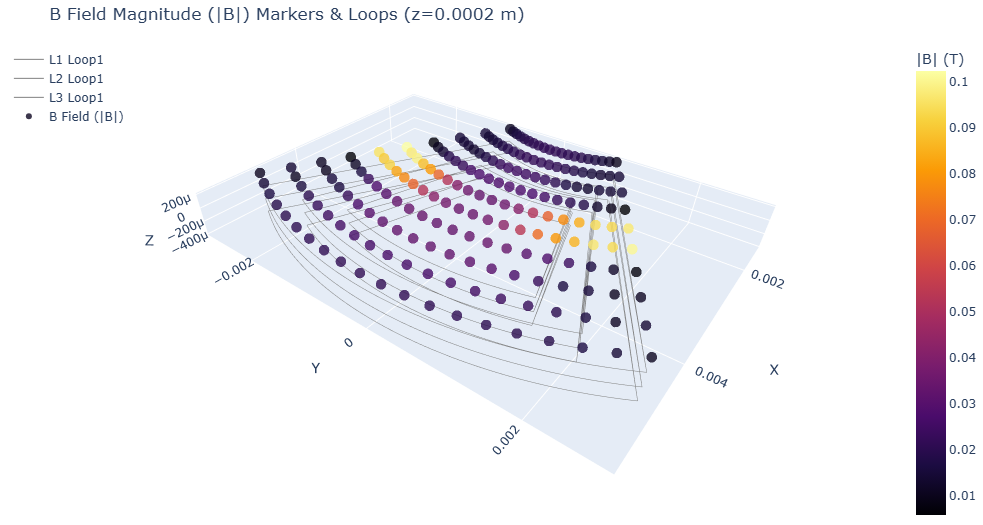
    Comparison of magnetic flux density calculations reveals good agreement between the simplified circular estimation and the detailed spatial analysis near the geometric centroid, both yielding approximately 0.04 T. However, the detailed analysis highlights significant spatial variation missed by the simpler model, with flux density increasing to nearly 0.1 T towards the radial edges. The next step will involve Finite Element Analysis (FEA) to provide a more comprehensive simulation and further validate these analytical findings.

    (Full Python Notebook will be added in the next 2 days)

  • PCB Drone Motor – 02

    PCB Drone Motor – 02

    Computational Estimation of Magnetic Flux Density for Layered Annular Sector Coils

    This post details my vision for a first attempt at estimating the airgap flux density generated by the stator coils in an axial flux motor topology using Python. Future iterations will include a grid-based Biot-Savart approach (calculating the field over an area) and eventually leveraging open-source 2D/3D FEA tools. I know there are many excellent commercial and open-source programs that perform these calculations already, but my primary motivation here was to further understand the underlying physics and calculation methods from first principles, specifically as applied to axial flux machines.
    (The Python notebook can be downloaded at the bottom of the page)

    This script demonstrates a workflow integrating geometric analysis with fundamental physics:

    1. Geometric Foundation: Using numpy, the code precisely defines the 2D cross-section of an annular sector (a “doughnut slice”), representing the physical space for the windings. Parameters like radii and arc angle define the core geometry.

    2. Centroid & Characteristic Dimension: The geometric centroid of the sector is calculated. Following this, a characteristic “average distance” from this centroid to the sector’s perimeter is determined. This metric provides a basis for positioning the current elements in the model.

    3. Coil Representation & Layering: The core of the model represents the winding pack. Instead of discretizing a potentially complex spiral path, this implementation utilizes concentric circular current loops centered at the geometric centroid.

      • The radii of these loops are derived from the calculated “average distance,” stepping inwards with a defined TRACE_DISTANCE. This structured approach creates a model of the current distribution intended to capture the primary magnetic contributions within the sector.

      • The model effectively handles multiple layers stacked vertically (NUM_LAYERS), incorporating the specified LAYER_SPACING between them.

    4. Physics Engine – Biot-Savart Law: The magnetic field calculation leverages the Biot-Savart Law directly. A dedicated function (biot_savart_loop_at_point) numerically integrates the field contributions from infinitesimal current segments (dl) around each modeled circular loop to determine the magnetic field vector (B) produced at any target point in space.

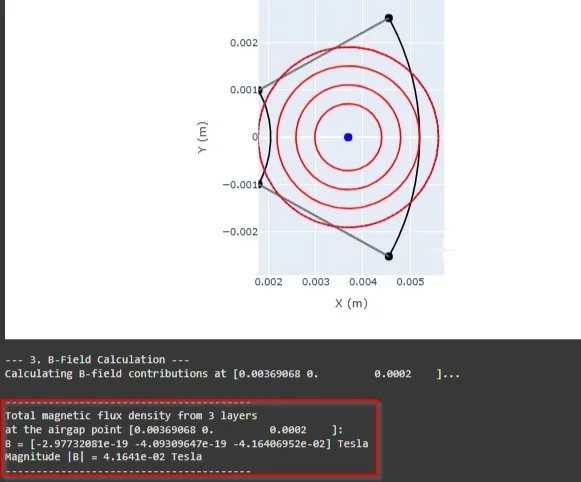
    5. Targeted Field Evaluation: The script computes the total B-field by vectorially summing the contributions from all modeled loops across all layers. This calculation is performed at a user-defined point, typically located in the ‘airgap’ region relevant to the device’s operation (e.g., a specific distance above the top layer’s centroid).

    6. Visualization with Plotly: Interactive plots generated using plotly are used throughout. They visualize the defined geometry, centroid, average distance metric, the positions of the modeled current loops, and the field evaluation point, providing crucial validation and insight into the model setup.

    Advantages of this Method:

    • Direct Physics Implementation: Applies the Biot-Savart law directly to the defined current sources, offering a clear link between the model geometry and the resulting field.

    • Model Transparency & Control: Python implementation allows full control over the geometric parameters and the current loop representation.

    • Computational Speed: For field calculations at specific points arising from known currents in linear media (like air), this direct summation is generally significantly faster than setting up, meshing, and solving a full FEA domain.

    • Educational Insight: Provides a practical platform for exploring how different coil parameters and layering strategies influence the magnetic field.

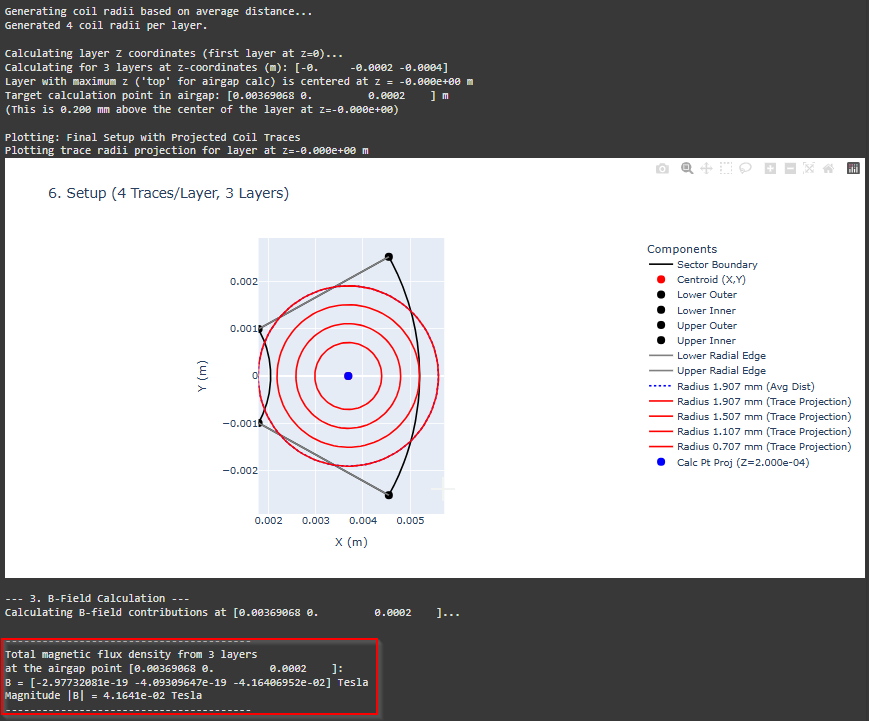
      The output of my script from a 3-layer design
    The output of my script from a 3-layer design

    Considerations:

    • This method models the current distribution using defined circular elements. It’s most suited for problems where the field is primarily determined by the source currents in air or linear materials.

    • It doesn’t inherently include the effects of complex magnetic cores (saturation, hysteresis) or solve for fields within those materials, which are strengths of FEA.

    • Consequently, while this direct calculation approach offers compelling speed advantages for rapid estimations, it may not achieve the same level of accuracy as a detailed FEA model, particularly for complex geometries or when material effects are dominant. The trade-off is speed for potentially reduced precision

  • Boost Converter

    Boost Converter

    Let’s start with a short inductor review:

    • Faraday’s Law drives inductors: current through a wire creates a magnetic field.

    • The voltage across an inductor is V= L ⋅ (dI/dt), proportional to the rate of current change and inductance (L).

      • Faster current shifts result in a bigger voltage spikes

      • If there is steady current (rate of change is 0), the output voltage from an inductor = 0

      • In the layout of a boost converter the voltage applied to the inductor is equal to the Vin, which results in a linear current rise that builds the magnetic field.

    • Typically a coil, an inductor stores energy in its magnetic field, often enhanced by a ferromagnetic core like ferrite—though air-core versions exist too

    Boost Converter Design

      Hand Calculations Passive Components
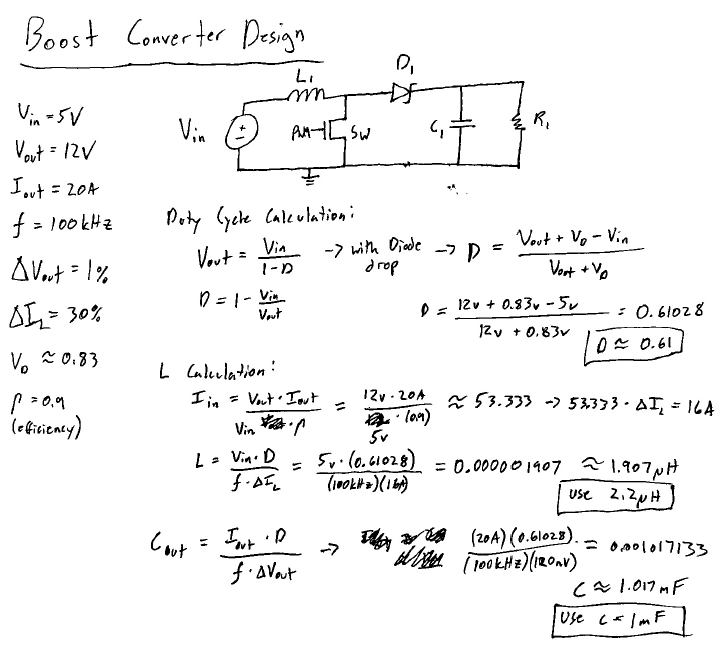
    Hand Calculations Passive Components

    At work I am used to high-power equipment, so for this boost converter, I chose 5 V in, 12 V out, and 20 A for 240 W of power output. Big designs like this punish sloppy math, and my first attempt proved it. I picked unrealistically tight ripple targets and messed up the input current, using Vout​ in the denominator Vin. This resulted in a on oversized capacitor by a factor of 10, which did not produce a pretty output.

    To fix that I used some common percentages—1% voltage ripple (0.12 V), 30% current ripple, and calculated a 53.33 A input current. With 90% efficiency my spice model output came together.

      LTspice Model
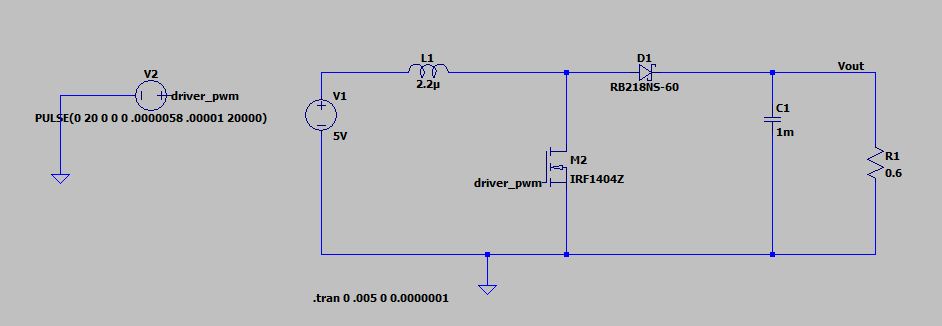
    LTspice Model

    In designing my boost converter circuit, I encountered a few practical challenges that underscored the importance of component selection and compatibility. One oversight occurred when I initially entered the capacitor’s equivalent series resistance (ESR) as 0.02 ohms instead of the intended 0.002 ohms. This seemingly small error significantly amplified the output voltage ripple, as ESR directly influences how effectively the capacitor smooths the boosted voltage. Correcting this brought the ripple under control, but I noticed the average output voltage remained slightly above my 12V target. To address this, I reduced the switch’s duty cycle from 61% to 58%, which aligned the output closer to 12V without noticeably affecting the ripple amplitude.

    I was able to reduce the duty cycle partly because I used an inductor larger than the ideal calculated value. A bigger inductor stores more energy in its magnetic field, which let it keep boosting the voltage even with a lower duty cycle. This ties into a core idea with boost converters: you don’t want the inductor’s magnetic field to fully collapse when the switch is off, since it needs enough energy to add to the next cycle to increase the voltage. The output voltage settles when the energy going into the inductor matches what’s delivered to the load and capacitor (minus losses, of course). This shows how critical it is to pick components that work together, especially since the switching frequency heavily influences the inductance needed to avoid dropping into discontinuous mode.

    For the diode, I opted for a Schottky type due to its efficiency advantages, well-suited to my moderate output voltage. Unlike traditional PN junction diodes, Schottky diodes feature a metal to N-type semiconductor junction, reducing the forward voltage drop to ~0.3V (vs. 0.7V for PN diodes) and eliminating recovery time by relying solely on majority carriers (electrons). This enables faster switching and lower power losses—critical for a boost converter’s high-frequency operation. The trade-off is an increased reverse leakage current when reverse-biased, due to the reduced Schottky barrier height, though this posed no significant issue for my 12V design. In applications with significantly higher output voltages, however, a different diode or an active switch might be necessary to handle reverse bias conditions.

    This experience reinforced how interconnected component choices are in power electronics. From capacitor ESR to inductor sizing and diode characteristics, each decision ripples through the system, shaping efficiency, stability, and performance.

      Vout, V at Inductor, Current through diode, Current though Inductor
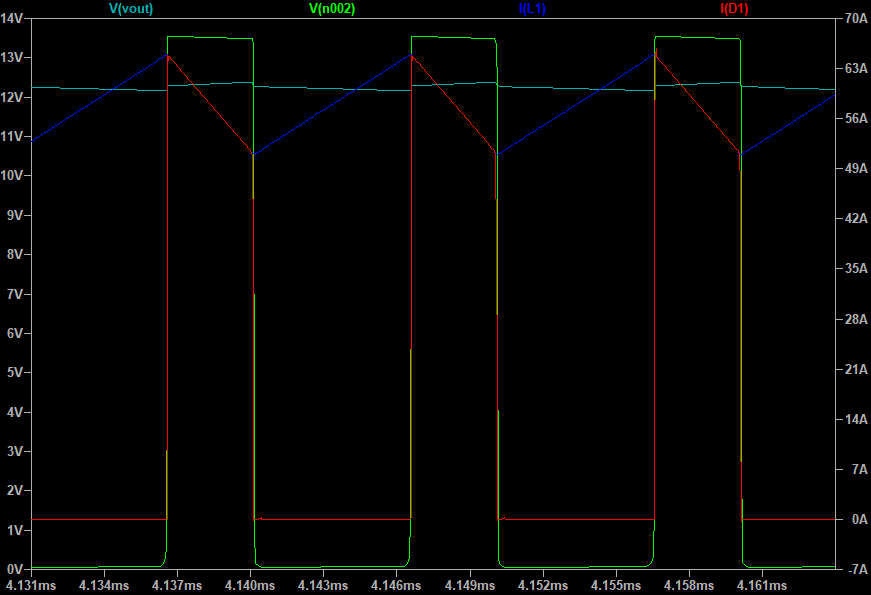
    Vout, V at Inductor, Current through diode, Current though Inductor

    To break down my boost converter’s operation, let’s define two phases: T1, when the switch is on and the inductor current (I_L1​, blue trace) rises, and T2, when the switch is off and the current falls.

    T1: Switch On

    • During T1, the input voltage (Vin​) drives the inductor (L), causing its current to increase linearly as the magnetic field builds. This follows V = L * (di/dt), visible in the blue trace’s upward slope.

    • When the switch is closed, the voltage at the switch node (Vn002​, green trace) falls to near zero because of the minimal resistance in the switch and inductor, while the voltage across the inductor remains equal to Vin.

    • Meanwhile, the capacitor (C) sustains the output voltage (Vout​) by supplying current to the load (R).

    • You’ll notice a slight dip in the Vout trace, evidence of voltage ripple as the capacitor discharges.

    • The diode, reverse-biased here, blocks any backflow from the output to ground, as confirmed by the red trace showing zero diode current.

    T2: Switch Off

    • When the switch opens in T2, the inductor’s magnetic field collapses, driving current through the diode to the capacitor and load at a steadily declining rate. This induces a voltage across the inductor (V = L * (di/dt)), which adds to Vin to produce the “boosted” Vout​.

    • The green trace Vn002​ spikes as the inductor’s voltage reverses polarity (voltage adds to Vin), driving the boost effect. This process transfers energy to the capacitor, which stores it to stabilize Vout​, smoothing the output and supplying current to the load.

    • The red trace now shows forward biased diode current flowing, matching the inductor’s discharge.

    These phases highlight how the inductor and capacitor work together: L stores energy in T1, then releases it in T2, while C ensures a stable output.

    Websites and References Used:

  • Buck Converter

    Buck Converter

    The purpose of this exercise was to review basic buck converter design. I originally learned this in class at Purdue but have not used it in 4 years and needed a refresher. I will continue this exercise with further reviews on other power converter topologies.

    I chose components and a scenario that is maybe not the most elementary buck converter design, but this forced me to consider aspects of design I would have otherwise missed.

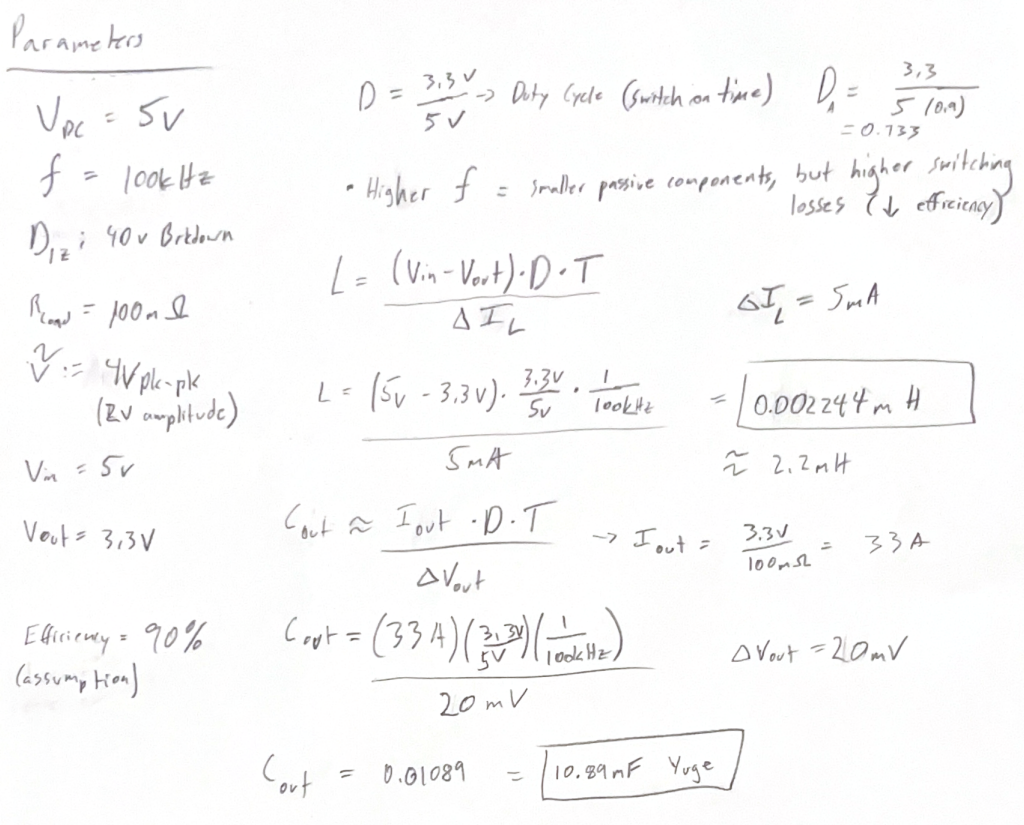
    With some help from a Texas Instruments PDF and the web, I calculated the Inductor and Output Cap from a parameter list I defined. I approached these parameters with an eMotor/electromagnetic background and intentionally chose a low resistance load.

      Hand Calculations for Cout and L
    Hand Calculations for Cout and L

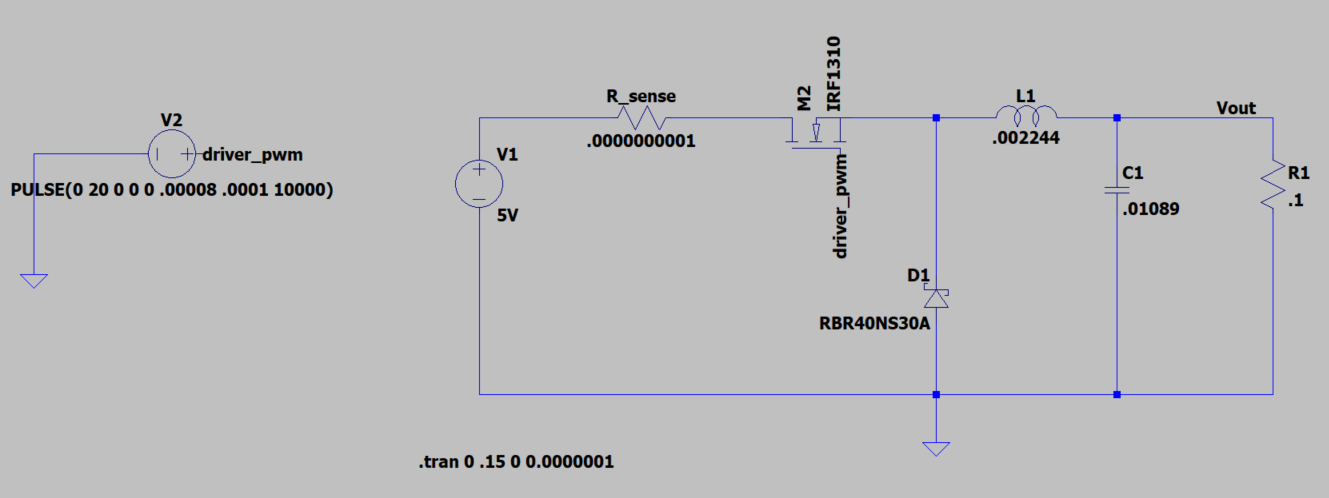
    Next Step was to create a model in LTspice. I started with generic spice components and improvised from there.

     LTspice Model
    LTspice Model

    The generic components I started with were not working correctly, I believe this was due to the large current draw and low pulse voltage. This led me to find appropriate components for the output current I calculated (33A). I chose a Schottky diode with an average forward current of 40 Amps and 30V breakdown voltage. I then changed to an N-type mosfet with a 42A continuous current rating. These component changes with an extended simulation window to overcome the transient time for the large passive components finally gave me some results close to what I was looking for.

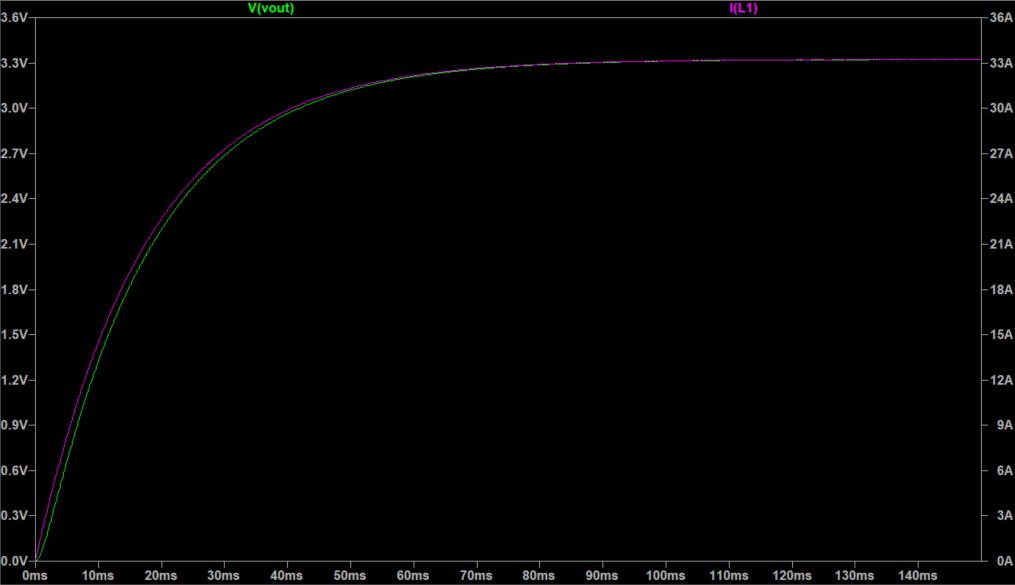
      Outputs Measured At the Load
    Outputs Measured At the Load
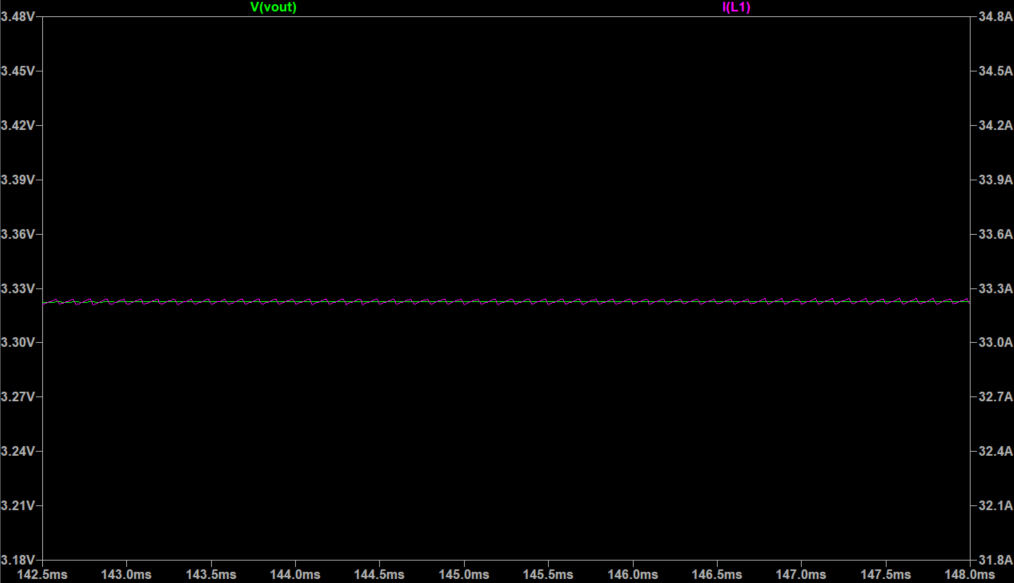
      Steady State Values
    Steady State Values

    As you can see above, the transient is pretty long, around 60-70ms. This was expected with a 10mF cap and 2.2mH inductor on the output. There could be controls or design changes implemented depending on the use cases to help mitigate this transient time.

      Duty Cycle and Efficiency
    Duty Cycle and Efficiency

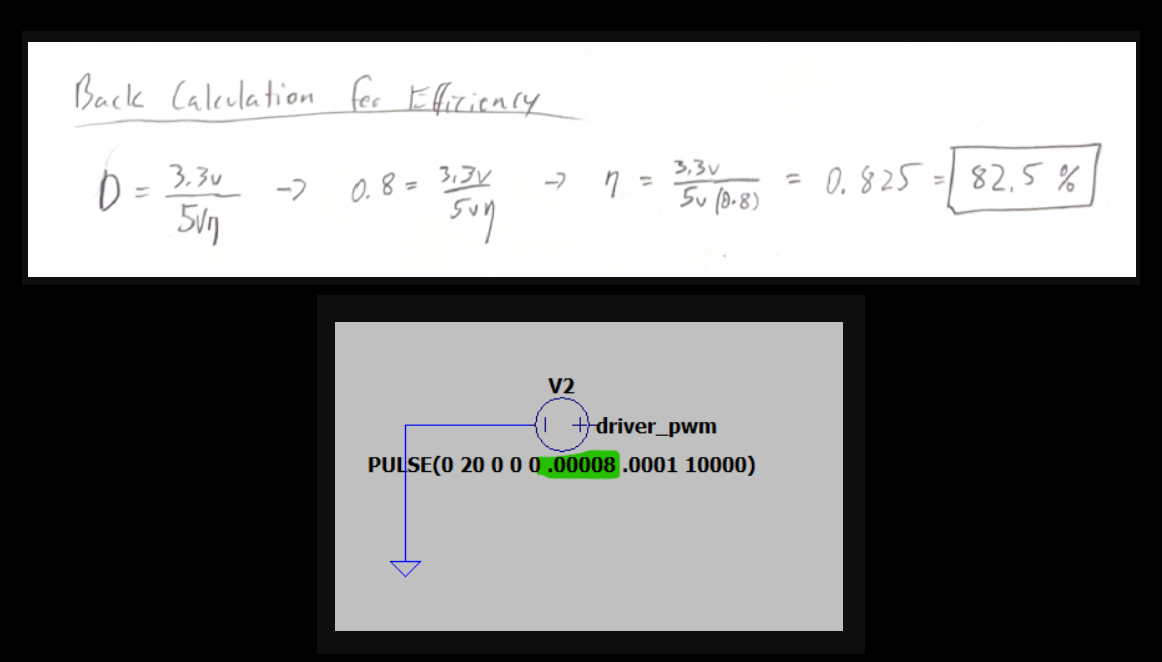
    From my estimations, the efficiency at this operating point is around 82.5%. I started out by calculating a duty cycle with an assumption of 90% efficiency, the output was around 3.0V. I manually adjusted the “Ton” parameter of the gate driver to achieve the desired output of 3.3V. The duty cycle that achieved 3.3V was 80%. I then plugged this back into the duty cycle equation and solved for the efficiency parameter. In ideal calculations it would be 66%, which highlights the inefficiencies of this design. My assumptions are that these losses mainly come from the switch and diode.

    I plan to revisit this design and try implementing improvements to increase efficiency. This would include plotting the losses on the diode vs the MOSFET at different duty cycles and evaluating the effect of replacing the diode with a switch. It might come down to needing a more efficient MOSFET with a lower Rds(on).

    Websites and documents used:

  • PCB Drone Motor – 01

    PCB Drone Motor – 01

    A quick intro to the project:
    This is a personal project inspired by my opinions on the future of electric motors and their use cases. I believe that we need to continue to find ways to make motors smaller, lighter, more power dense, and easier to manufacture all while simplifying the number of subcomponents. This will benefit every industry, but my specific focus is robotics and drones. In the future, these items will be mass produced at volumes far beyond almost any other electric motor use case, therefore every pound, penny, and second count!

    I started working on this in late January of this year (2025) and conducted research, wrote analytical analysis scripts, and designed a prototype. The first prototypes were ordered at the beginning of March and I expect to begin proof of concept and functional testing as soon as they arrive.

    If all goes well, I plan to try and patent aspects of my design at somepoint. For this reason, I will not share all the details on the design and operation.

    I will make more detailed posts on this project in the coming weeks/months, please come back every so often to check for updates!

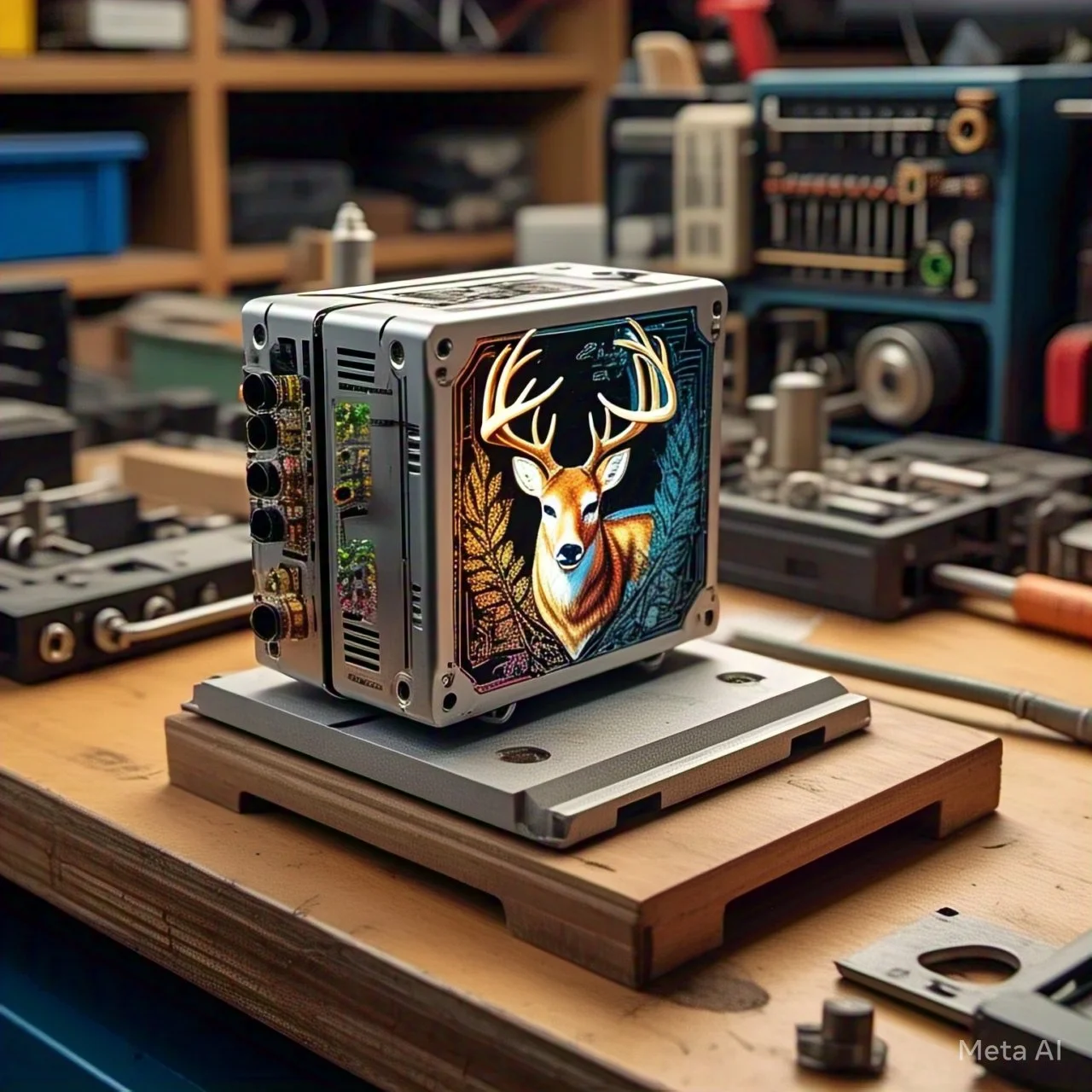
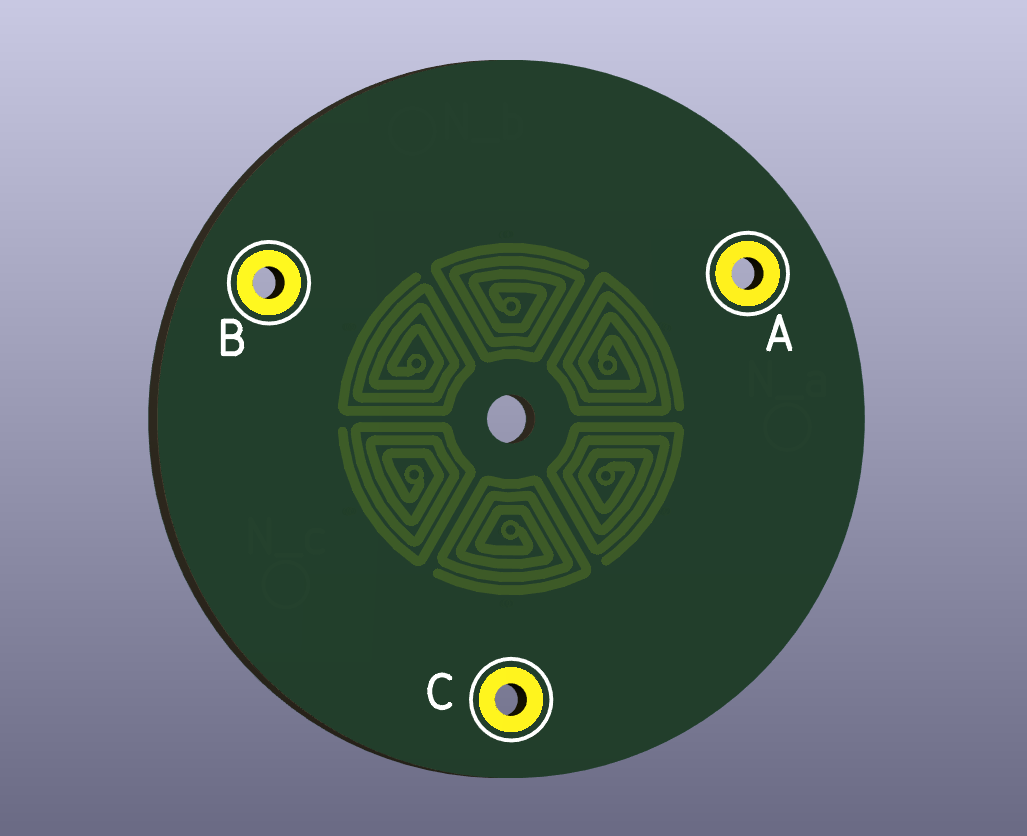
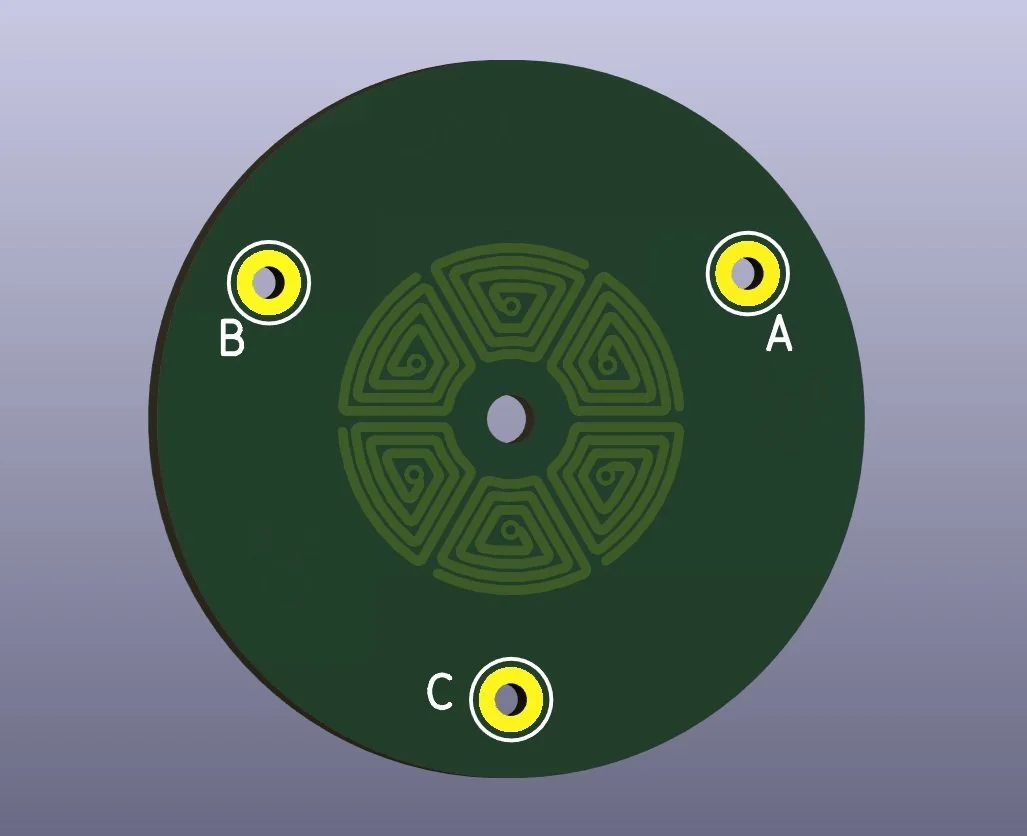
    Below is an image of the stator prototype I just sent for manufacturing.

      Stator Prototype Sample Image
    Stator Prototype Sample Image
  • AI & Machine Learning Course

    AI & Machine Learning Course

    Throughout winter and summer 2024, I completed the Post Graduate Program in AI and Machine Learning: Business Applications from UT Austin. The 6-month program provided valuable insights into Python use cases, machine learning, and LLM applications. The number of opportunities and the level of freedom afforded by open source and Python was an eye-opening experience. All class modules included lectures, quizzes, hands-on application through mentored learning sessions, and an implementation project.

    The following sections were covered in the class:

    Module 1: Python Foundations
    Module 2: Machine Learning
    Module 3: Advanced Machine Learning
    Module 4: Neural Networks
    Module 5: Computer Vision
    Module 6: Natural Language Processing

    To keep things concise, I will post my Google Collab python projects (Google’s version of jupyter notebooks) below as html downloads:

    Certificate of Completion:

     Checkout the link above this certificate if you are interested in the class.
    Checkout the link above this certificate if you are interested in the class.
  • Alternator Regulator Study

    Alternator Regulator Study

    Another personal project inspired by electric motors. My friend gave me an alternator he pulled from a mid 2000s GM car in a junk yard (not a subtle jab) here in metro Detroit.

    My vision was to turn this into a wound field electric motor. I planned on designing my own wireless power transfer system and making 3d printed parts to test my design. This is obviously not any type of groundbreaking innovation but rather was meant to be a learning project. It would force me to practice CAD, review power electronics, and test out some control theory. I began by taking apart the brush system and control board, then did DMM testing to make sure the windings were still conductive. I then studied how the control board worked, which was a really good fundamentals of electrical engineering review.

    Shortly after this point I had the idea for my PCB eMotor and pivoted my time towards that project. I believe the PCB eMotor has some truly innovative aspects while incorporating many of the same learnings I would have gotten from this project. Please follow the PCB eMotor project in the dedicated respective posts.

    I will explain my learnings from the control board study below, as there was valuable information in that for me and it became the bulk of my takeaway from looking into alternators.

      Exxotest Guide Used
    Exxotest Guide Used

    The main source of content I used for looking into alternator controls and operation was this guide I found online from Exxotest. Here is the link

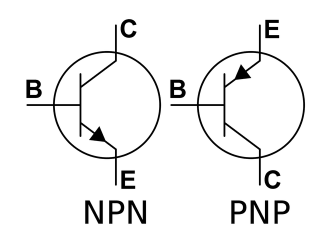
    I had to begin with learning about BJT operating principles. There was very little exposure to this in my coursework as most of the focus was on newer switch types. In short, a BJT (Bipolar Junction Transistor) is a semiconductor that controls current flow. When the threshold voltage drop is met across the base and emitter terminals (typically around 0.7V), a small current flows, which modulates the larger current flow between the collector and emitter. This functionality is commonly used as a switch or amplifier and can be doped as an NPN or PNP transistor.

      BJT Symbols
    BJT Symbols

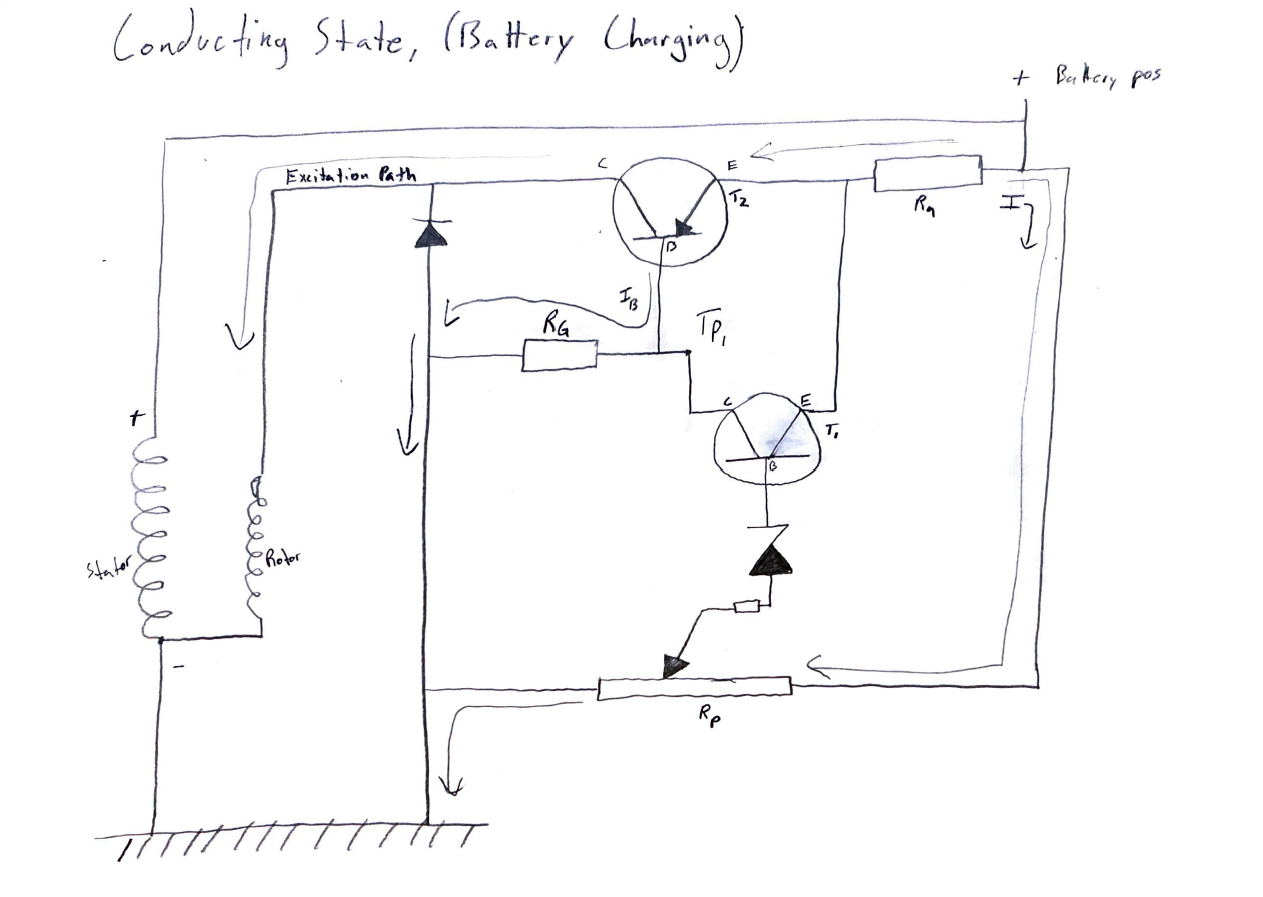
    Conducting State:

    In the conducting state, the rotor is excited and the alternator generates power to charge the battery.

      Conducting Mode Sketch
    Conducting Mode Sketch

    Key aspects of conducting operation:

    • When rotor is excited, transistor T2 is conducting. 

    • The potential across the Zener diode remains below its breakdown threshold, thus preventing the activation of transistor T1 and allowing T2 to conduct. 

    • With T1 open, the base-emitter potential on PNP transistor T2 reaches a sufficient magnitude to initiate conduction.  

    • Though not specified, my assumption is that the base current of T2, and consequently its conduction, is regulated by the ground resistor (Rg). 

    • The voltage divider formed by resistors Ra and Rp establishes the reference voltage applied to the Zener diode. 

    • The output diode acts as a unidirectional conductor, preventing the rotor excitation current from flowing to ground.  

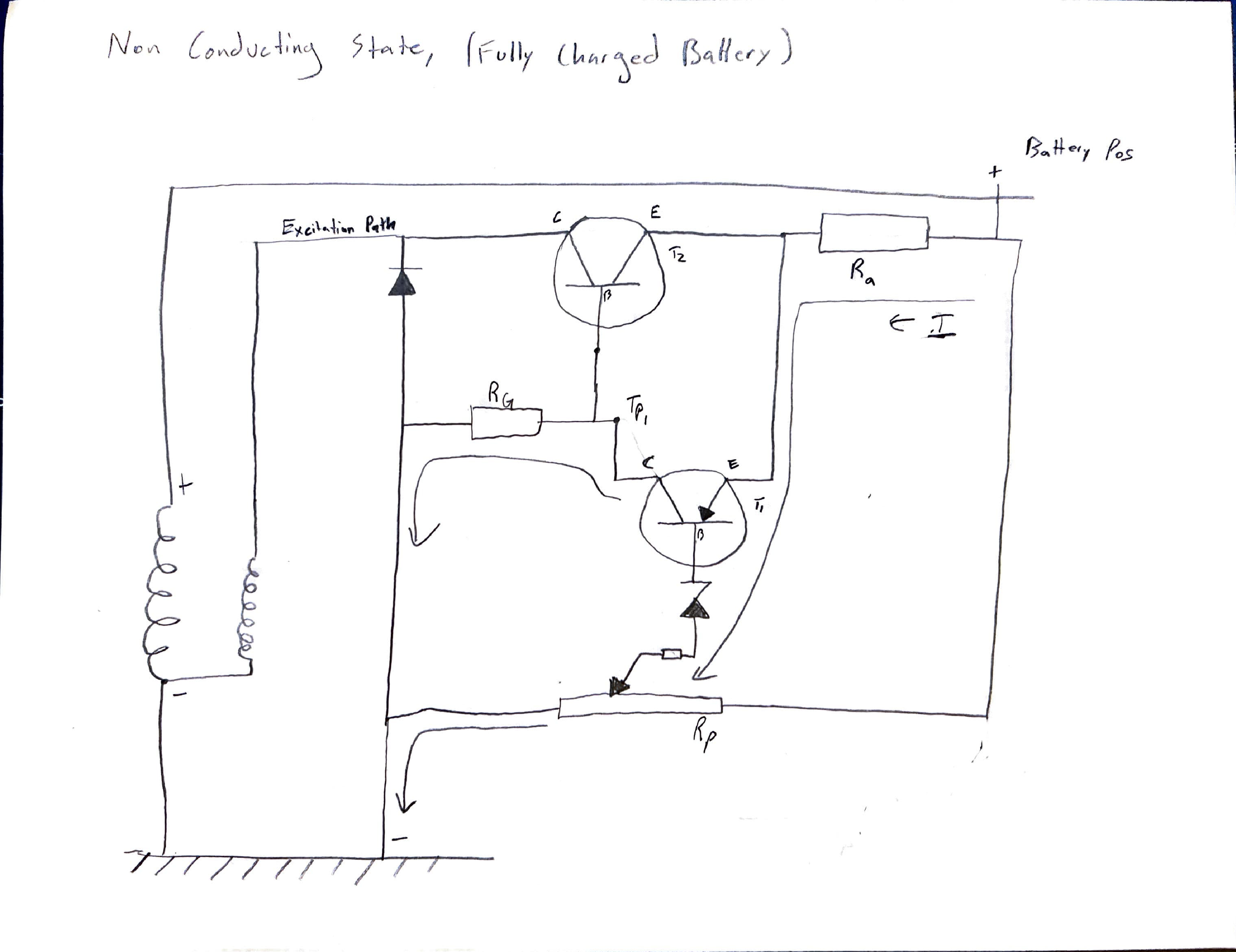
    Non-Conducting State:

    The non-conducting state prevents current flow to the rotor, preventing power generation and battery charging.

      Non-Conducting Mode Sketch
    Non-Conducting Mode Sketch

    Key aspects of non-conducting operation:

    • The fully charged battery voltage provides sufficient potential to overcome both T1’s Vbe drop and the Zener breakdown voltage, facilitating base current flow through the Zener diode. 

    • When T1 saturates, its low collector-emitter voltage (Vce) reduces the base-emitter voltage (Vbe) of T2 below its activation threshold. This is because a saturated BJT exhibits a very low Vce, typically 0.1V to 0.2V, which is less than the typical 0.7 Vbe activation threshold. 

    • With T1 active, current diverts to ground via the ground resistor (Rg). 

    • This design opens T2 while minimizing T1 current draw, preventing rotor excitation in a high-charge state. 

    LT Spice Simulations:

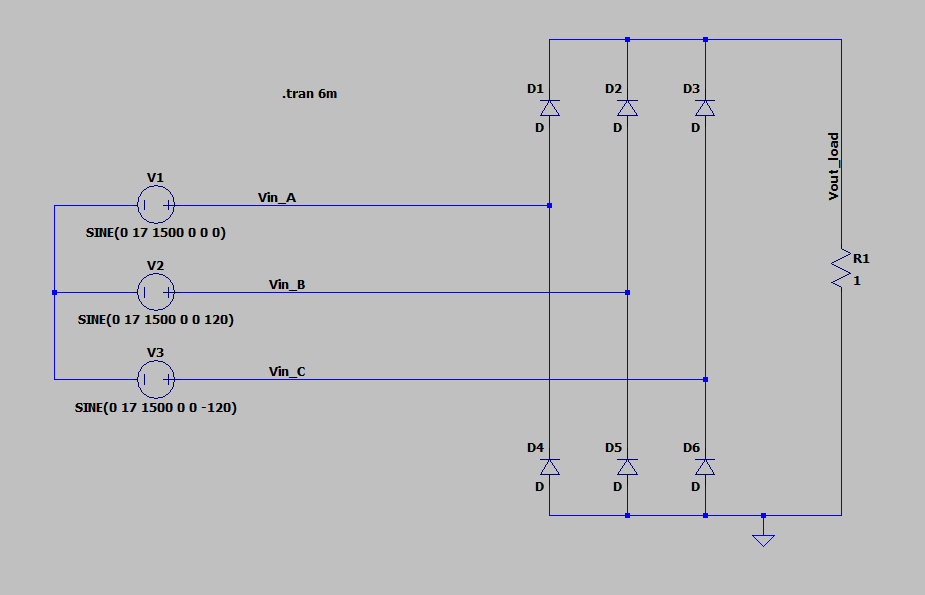
      Diode Rectification Circuit
    Diode Rectification Circuit
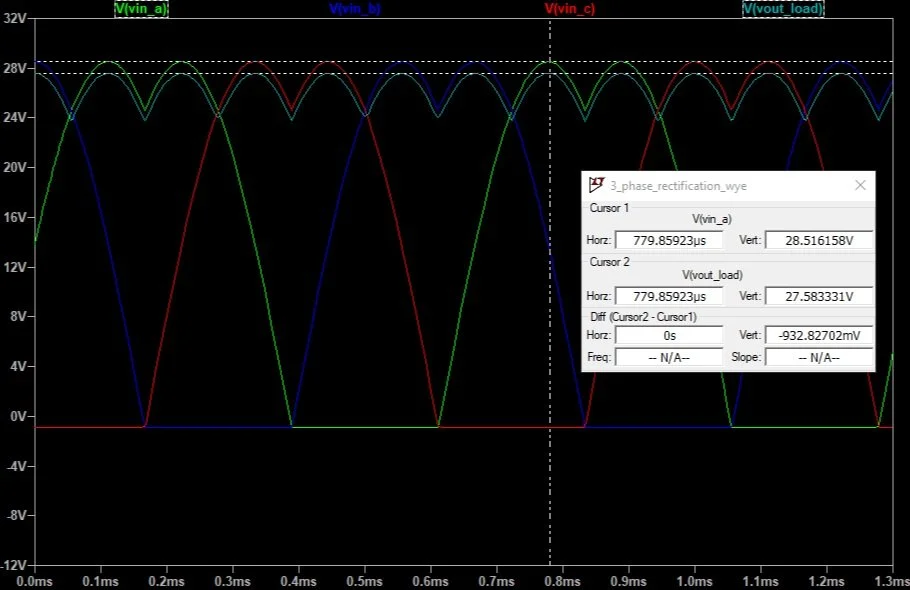
      Diode Rectification Circuit - Voltage Plot
    Diode Rectification Circuit – Voltage Plot

    I am very much a visual learner. I created this LT Spice model so that I could visualize the inputs and outputs as well as exploratory analysis of circuit behavior. I believe the voltage drop between the output and input waveforms is due to the diode. If you take a look at the difference between the cursors, the maximum difference is about 0.9V. This is close to 0.7V, which is typical for a PN junction. The low-value resistor creates a high load, which likely influences the diode’s voltage drop and output voltage ripple. I tried adding a 1mF capacitor across the output and this removed all of the ripple in the output voltage.

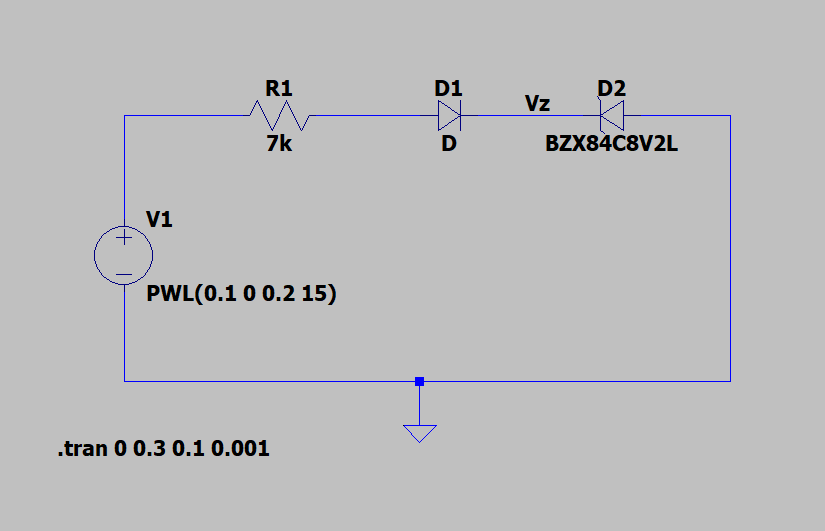
      Zener Diode Test Circuit
    Zener Diode Test Circuit
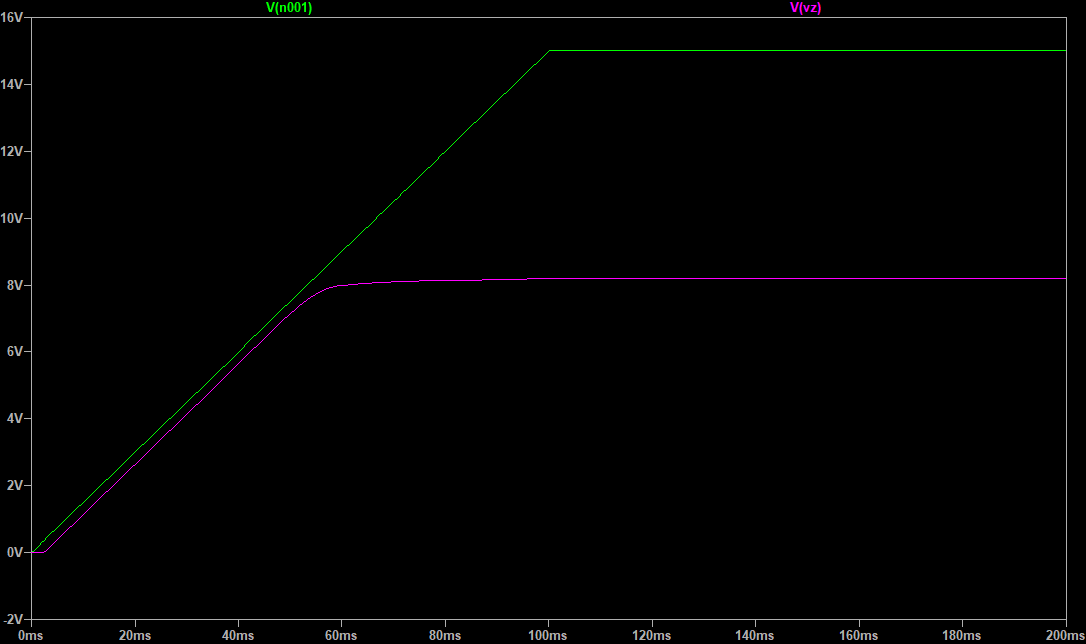
      Zener Diode Test Circuit - Voltage Plot
    Zener Diode Test Circuit – Voltage Plot

    I also created this circuit for visualization purposes. The breakdown voltage of this particular Zener diode is 8.2V. You can see that the voltage rolls off at this point and flattens out as current begins to flow through the reverse biased diode.

    Conclusions:

    This project served as an effective review of circuit fundamentals and offered a practical opportunity to study BJT switches. It was really neat to see an example of a control strategy using only analog components. In the future, I’m interested in looking into the complexities of the Rp resistor in the voltage divider circuit.

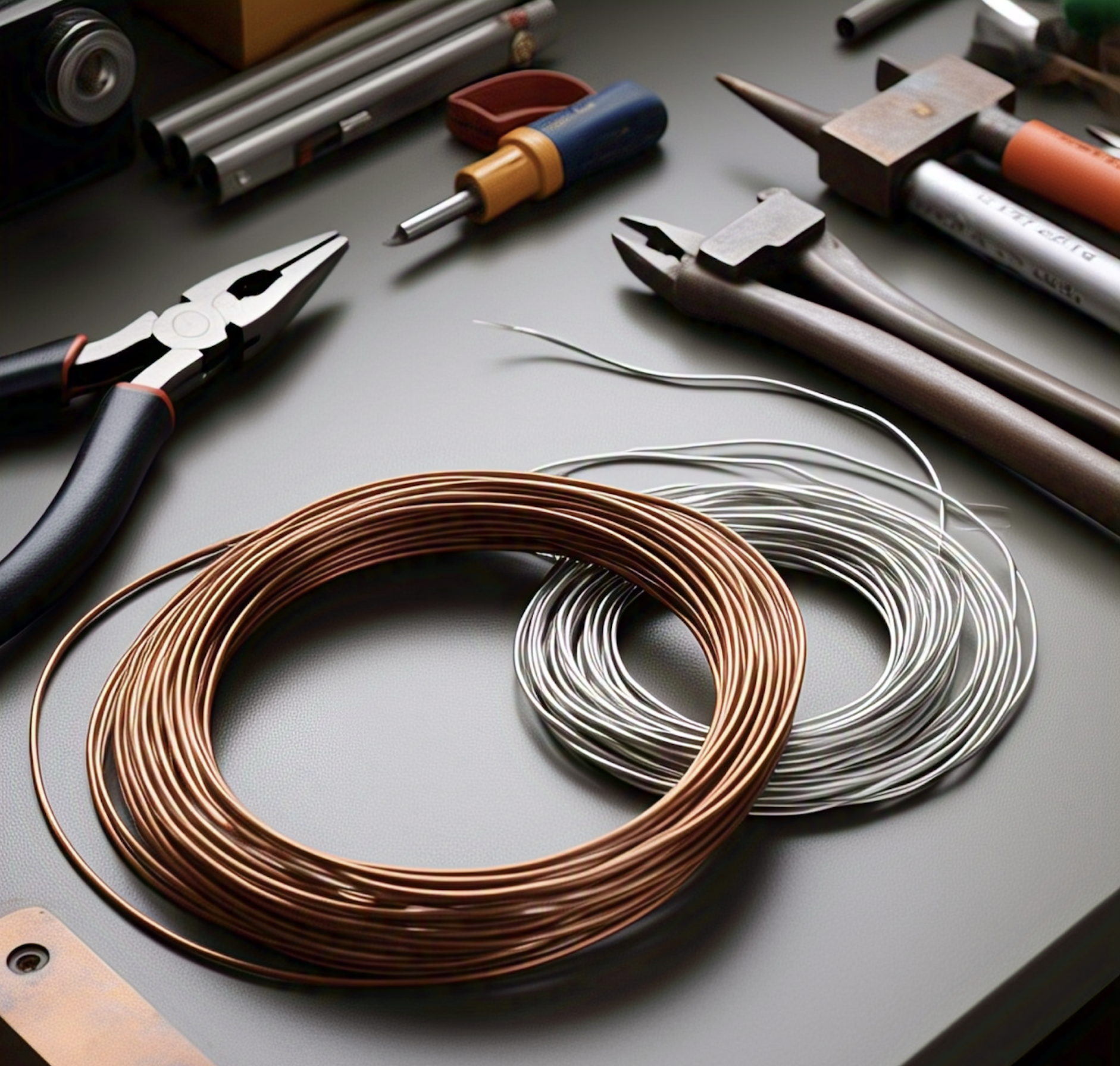
  • Cu vs. Al Resistance Considering Skin Effect

    Cu vs. Al Resistance Considering Skin Effect

    This short research topic came up through discussion with my coworkers. We all knew that copper had lower resistance than aluminum and that it was due to resistivity, but didn’t know the details of that. We realized that none of us could answer the question “Why does copper have a smaller skin depth than Aluminum?” To gain a complete understanding, we naturally turned to first-principles physics. 


    The DC Case: 

    Copper has a lower intrinsic resistivity than aluminum, which is a multiplier in the formula for resistance: 

    R = ρ * (L / A) where: 

    • R is resistance (Ohms) 

    • ρ is resistivity (Ohm-meters) 

    • L is length (meters) 

    • A is cross-sectional area (square meters) 

    Lower resistivity means the material is a better conductor.  

    When an electric field is applied across a conductive material, it causes electrons to move in a specific direction relative to the field. Electrons of equal magnitude are the charge carrier in both copper and aluminum.  


    Consider the equation for approximating conductivity (Drude Model), which is the inverse of resistivity: 

    σ ≈ (n * q² * τ) / m   (m is the effective mass of the electron)  

    τ is the mean free time, which is longer in copper due to its atomic structure resulting in less scattering of electrons compared to aluminum. 


    Understandably, electron mobility is the main factor in the resistivity of materials. Copper’s electrons have the ability to move more freely, leading to higher conductivity or inversely lower resistivity.  

    Room Temperature Resistivity values:  

    Copper: ≈ 1.68 x 10⁻⁸ Ohm-meters 

    Aluminum: ≈ 2.65 x 10⁻⁸ Ohm-meters 

    Aluminum is roughly 1.58 times more resistive than copper.  

    The AC Case (skin effect):  

    Let’s look at the equation for skin depth: 

     δ = 1 / √(π * f * μ * σ) Where: 

    • δ = skin depth (meters) 

    • f = frequency  

    • μ = magnetic permeability ≈ μ₀ = 4π x 10⁻⁷ H/m (for both copper and aluminum) 

    • σ = electrical conductivity (S/m) 

    As described in the DC section, copper has a higher conductivity than aluminum. Looking at the formula above we can see that larger conductivity value will result in lower skin depth. As a result, the skin depth of copper at any given frequency is going to be less than aluminum.  

    The question remains, “what causes skin effect?”  

    With AC current, the direction and magnitude of the flow of electrons is constantly changing. Due to Ampere’s law, the changing current creates a fluctuating magnetic field around the conductor. This changing magnetic field induces a voltage within the conductor (Faraday’s Law), which in turn drives eddy currents. Lenz’s law dictates that the induced eddy currents always oppose the change in magnetic field. The changing magnetic field is strongest in the center of the conductor. Consequently, the eddy currents in the center flow opposite to the main current, which create an opposing magnetic field that pushes the main current away to the edges of the conductor. This situation can be thought of as the center of the conductor having an inductive impedance. Current wants to flow in the path of least resistance, therefor redistributing to the surface of the conductor.  

    Summary:

    What we really wanted was to understand why skin effect happens. Working through the cause-and-effect using Maxwell’s equations helped us get there and provided the understanding we were looking for. It’s now clear that the skin effect is the direct reason for power losses in conductors at high frequencies – those “AC losses” that are so important to consider when designing electromagnetic systems.

    Materials Used:

  • LiDAR Learning

    LiDAR Learning

    LiDAR learning was my senior design project in my final semester at Purdue. I worked as an electrical engineer on a team of 4 with three computer engineering students. My responsibilities were to guide and lead the team as well as develop the power system for the project and design the PCB for our end product.

    Please see below for more details on the project!

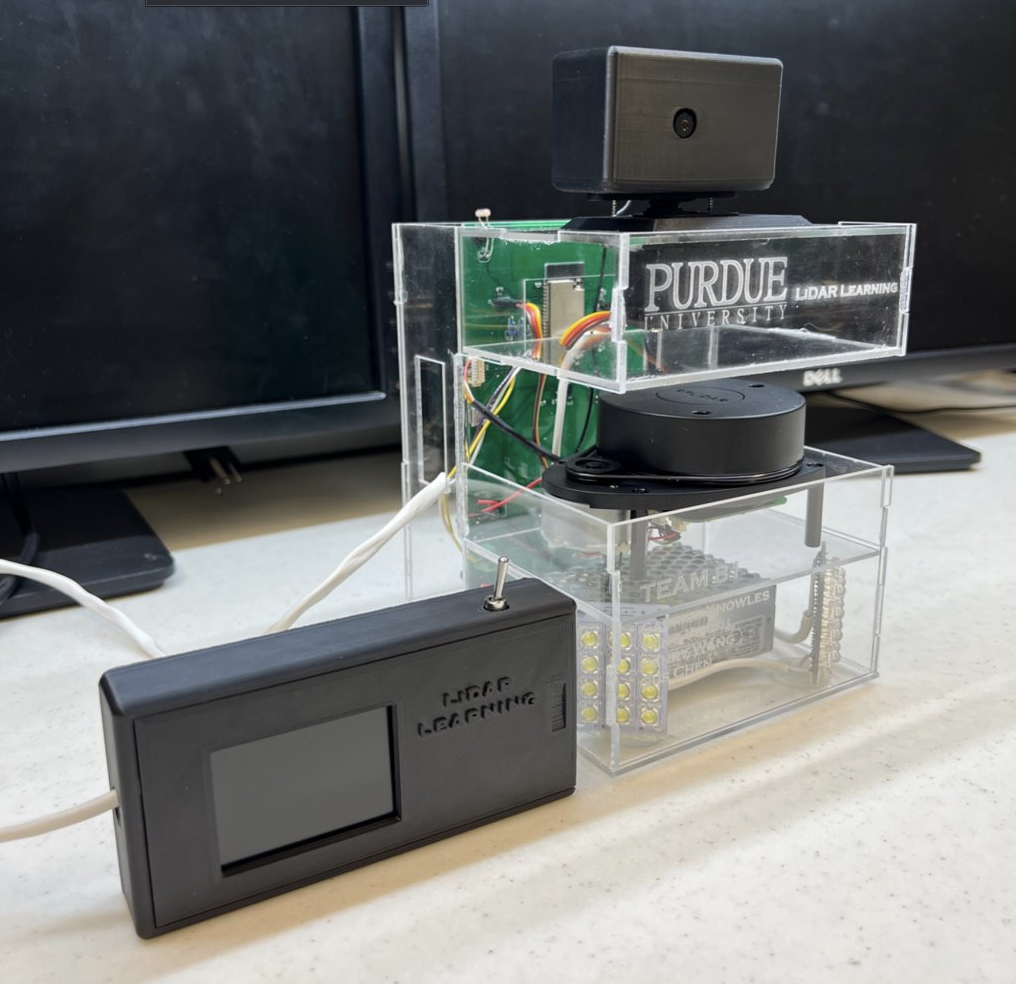
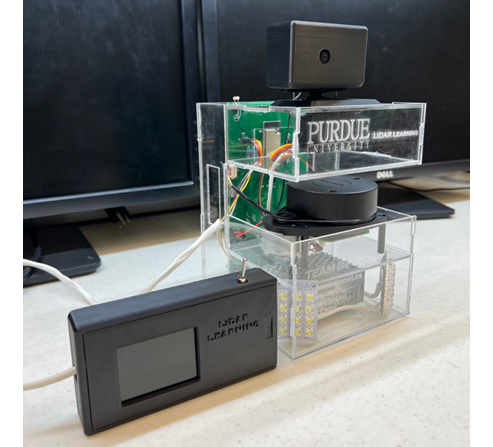
      Project Photo
    Project Photo

    Project Overview

    The primary goal of this project is to design a device that assists teachers in identifying potential threats outside their classrooms without compromising their safety. The device integrates a camera mounted on a servo motor, a LiDAR sensor, and a light sensor to provide a comprehensive monitoring system. The camera captures real-time video, while the LiDAR sensor detects the location of subjects outside the classroom. This data is processed by a microcontroller, which controls the servo motor to keep the subject centered on the monitor inside the classroom. Additionally, an LED light is activated in low-light conditions to ensure clear visibility.

    Demo Video

    Inspiration

    The Oxford High School shooting during my Fall 2021 internship in Michigan took place nearby and deeply affected me. As an engineer, I immediately began thinking about how technology could help mitigate such tragedies. My initial concept involved a comprehensive defense system using strategically placed LiDAR sensors throughout a school to track individuals in real-time. This LiDAR tracking data would be the input for a neural network designed to identify potential threats and, based on its analysis, control the building’s doors. By analyzing movement patterns, the system could identify potential threats and quickly and safely contain them, limiting their mobility. This would allow students and staff in unaffected areas to evacuate safely while the threat was isolated.

    Budget Constraints

    Due to a limited budget of approximately $400, the project scope had to be significantly reduced. This constraint prevented the team from developing the multiple-device system and incorporating the machine learning capabilities of multiple scanners that my original vision entailed. Despite these limitations, we successfully created a functional safety device using a single 2D LiDAR scanner and a camera.

    Key Features and Design Requirements

    1. LiDAR Sensor: The RPLiDAR sensor scans the hallway and detects moving subjects. It provides accurate distance and angle measurements, which are used to control the camera’s movement.

    2. Camera and Servo Motor: The camera pedestal rotates to follow the moving subject as indicated by the LiDAR mapping. This ensures continuous monitoring of potential threats.

    3. Light Sensor and LED: A photoresistor detects the brightness of the environment and activates an LED fixture if the hallway is too dark. This feature ensures that the camera can capture clear video even in low-light conditions.

    4. Power Supply: The device is powered by a standard wall outlet, making it easy to install and use in any classroom.

    5. User-Friendly Interface: A TFT display inside the classroom receives continuous live video feed via WiFi connection. An on/off switch is located next to the display for easy control.

    System Integration and Operation

    The system is designed for easy mounting outside classrooms and is powered by standard wall power. The LiDAR sensor continuously scans the surrounding area, tracking the closest object and rotating the camera to the corresponding angle. During a lockdown, the integrated illumination system activates, ensuring clear visibility for the camera. The video feed is then wirelessly transmitted to a display inside the classroom, allowing teachers to monitor the situation without exposing themselves to potential threats.

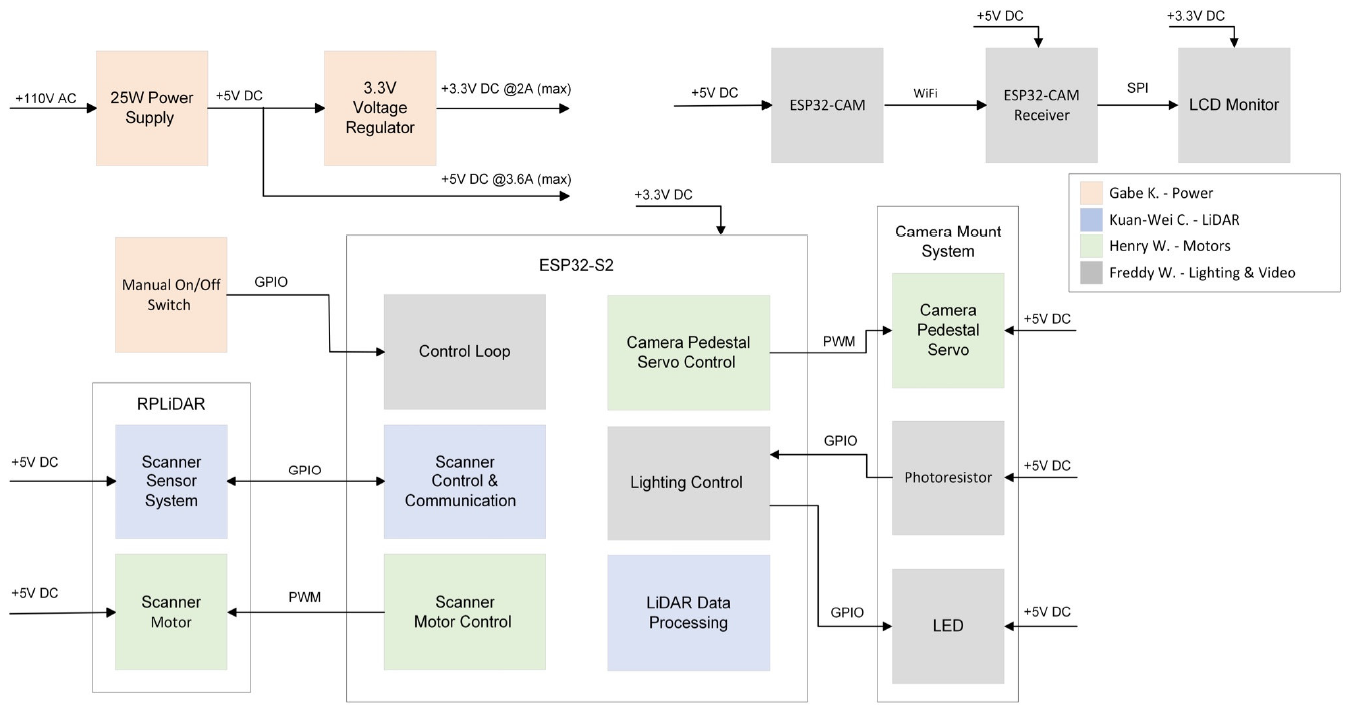
      System Block Diagram
    System Block Diagram

    System Block Diagram Explained

    The 5 Subsystems

    • RPLiDAR – Self-contained LiDAR, controlled by ESP32-S2

    • ESP32-S2 – Main controller, processes LiDAR data, controls hardware

    • ESP32 – Camera/controller interface, Bluetooth communication

    • Camera Support – Servo-driven camera mount, light sensor, lighting

    • Power System – AC/DC converter, 3.3V buck converter

    My Responsibilities:

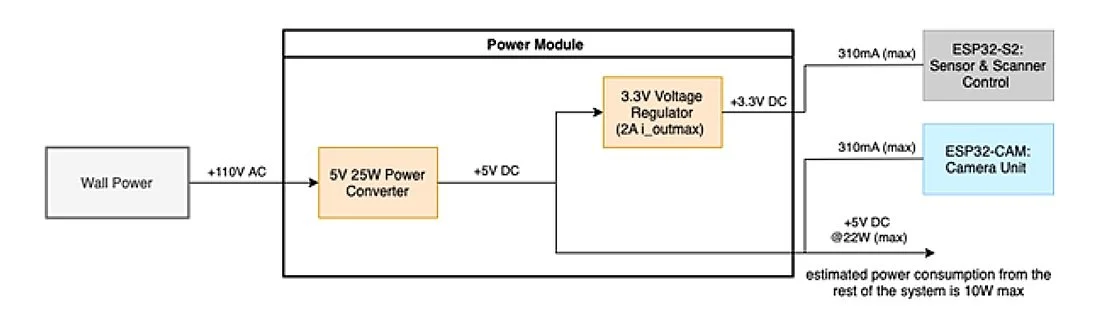
    As the EE guy on the team, my main responsibility was to design the power system for the project. The +3.3V rail powers the ESP32-S2 and its USB interface components, while the +5V rail powers the remaining components and sensors. The external display is powered via a dedicated +5V DC cable.

      Power Subsystem Block Diagram
    Power Subsystem Block Diagram

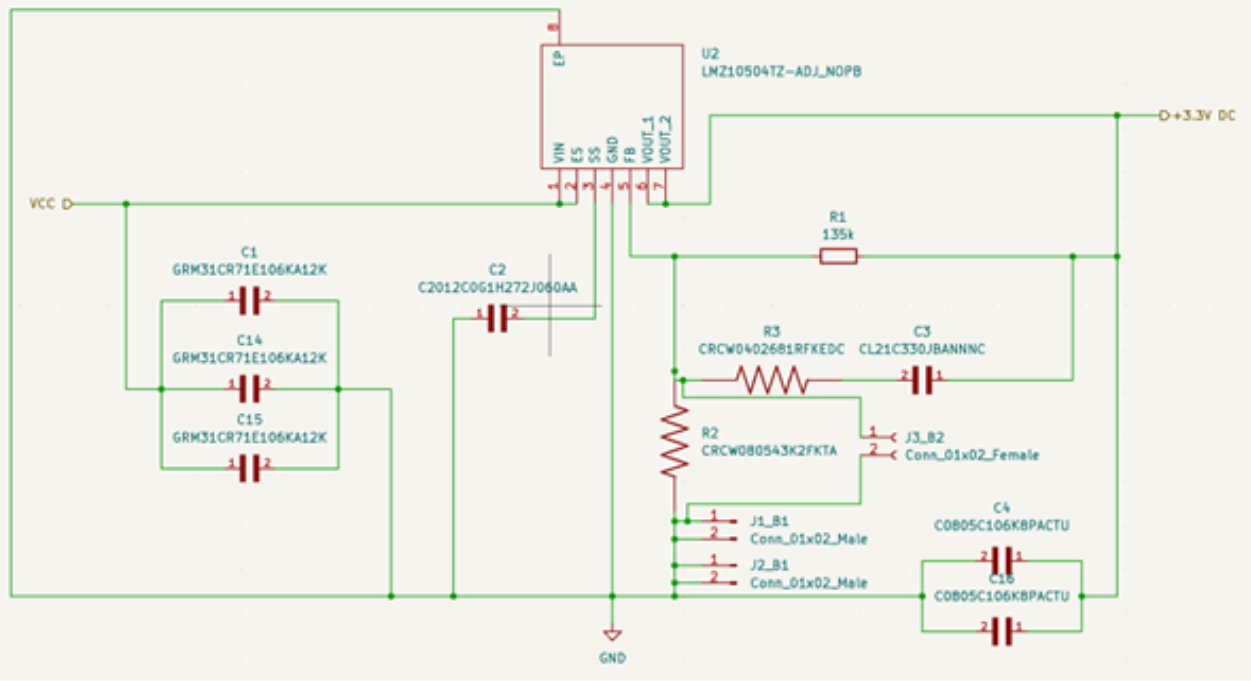
    Buck Converter

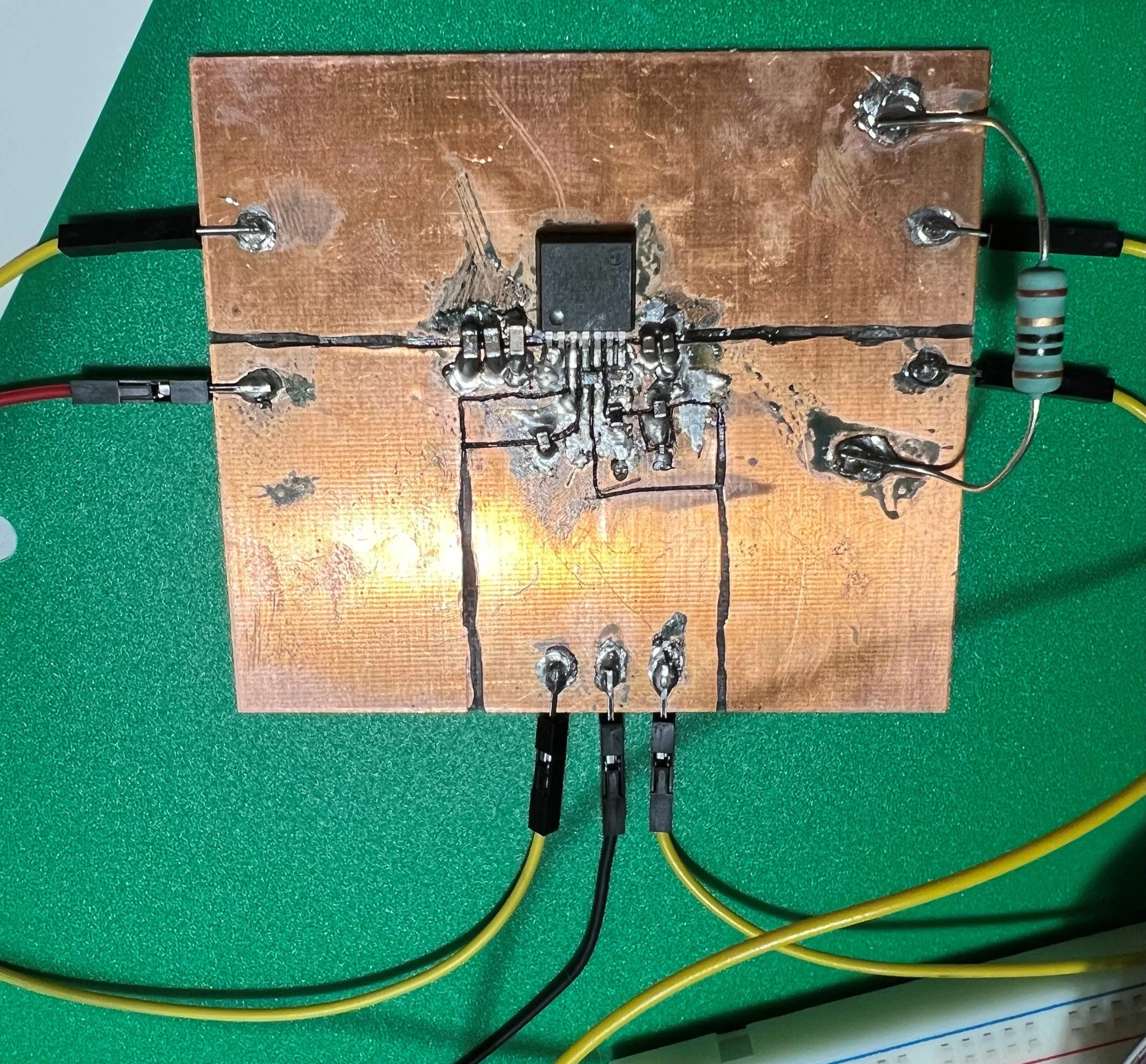
    I designed a buck converter voltage regulator using TI’s LMZ10504. Prototyping on a copper clad board proved challenging. After resoldering two times, I was confident it wasn’t a soldering issue or design flaw. Throughout the process, I used an oscilloscope to verify inputs and outputs and double-checked my feedback loop design. Despite the resistors being within the datasheet’s specified range, my testing pointed to the feedback loop as the problem.

    Confused, I consulted our lab mentor, a retired circuit designer with over 40 years of experience. He independently diagnosed the issue as the feedback resistors, specifically R1 and R2. While the datasheet values seemed appropriate, they were too high, preventing sufficient current from reaching the IC’s feedback pin for proper regulation. We lowered the resistor values, and the regulator then functioned as expected. This taught me a valuable lesson of the importance of experience; sometimes, theory and datasheets just aren’t enough.

    PCB Design

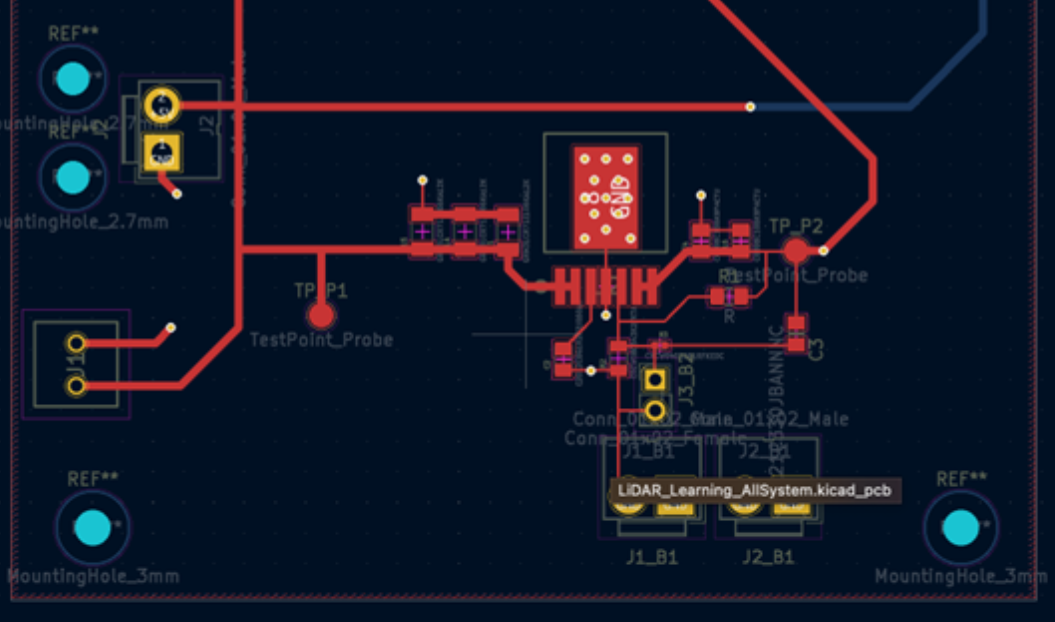
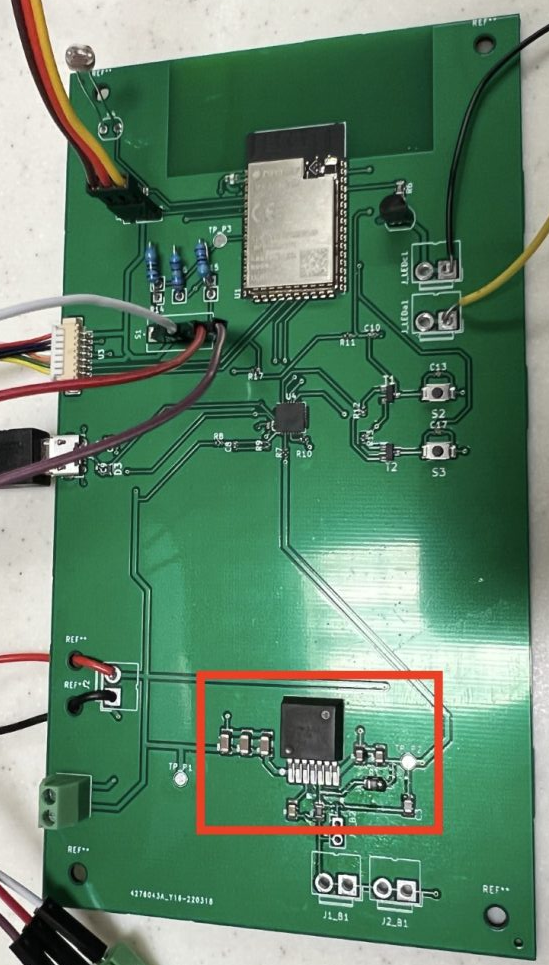
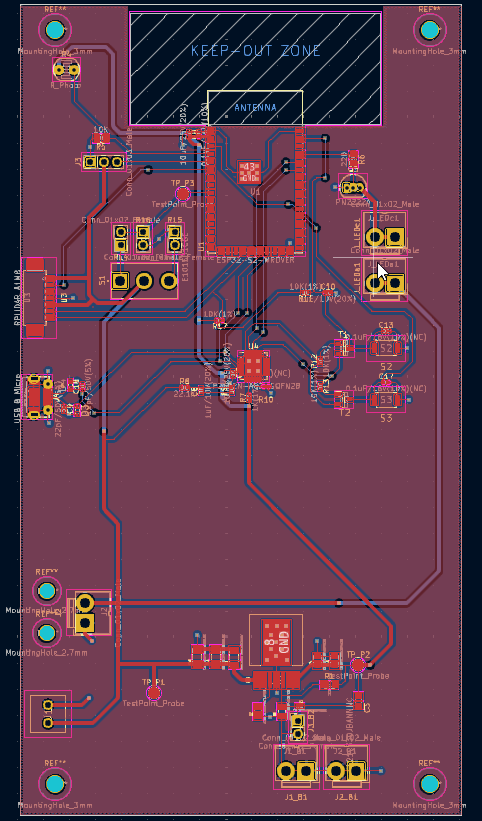
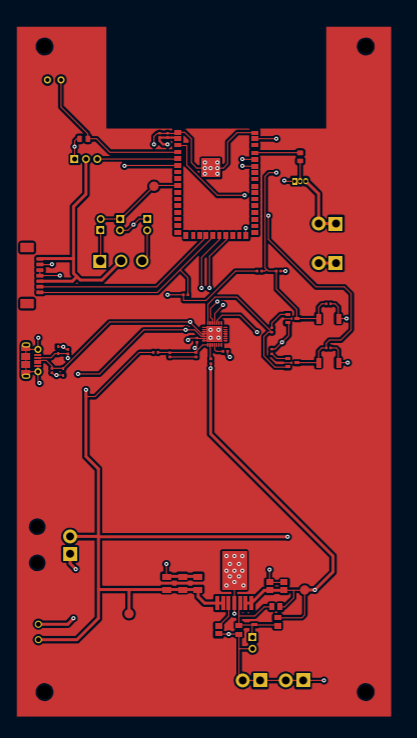
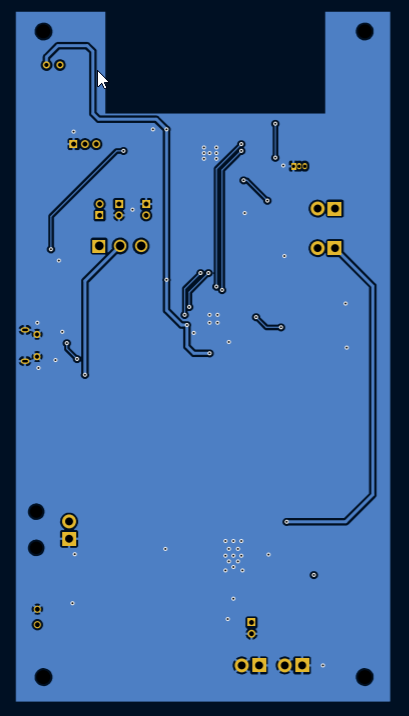
    During one of my internships, I gained experience reading schematics and PCB layouts, and sat in on a design review where experienced avionics designers critiqued a junior designer’s work. Those two hours were a crash course in PCB design.

    For our senior design project, I volunteered to design the PCB, which involved consolidating subsystem schematics and tackling the puzzle of component placement. Our focus was on placing components according to physical interface locations, not size or efficiency. While I wouldn’t want to do it 100% of the time, I find PCB design, like coding, to be a rewarding exercise.

    Whether through luck or thorough preparation, our PCB and components worked perfectly after assembly. Teammates 3D-printed camera and controller enclosures, and we had a laser-cut enclosure fabricated. We were quite happy and proud of how our final product turned out!